


Ecommerce product taxonomy 2026 guide for higher conversions

Last updated on June 8th, 2026

If 50% of online shoppers leave a store because they couldn’t find what they wanted, your eCommerce taxonomy might be costing you more than your ad spend.
Most store owners obsess over product photos, pricing, and promotions. However, they completely overlook the category structure holding everything together. Poor taxonomy in eCommerce leads to frustrated users, wasted ad spend, and pages that Google refuses to rank.
A well-built eCommerce taxonomy framework solves all three problems at once. It improves navigation, helps search engines understand your catalog, and gets customers to the right product faster.
This guide covers everything: from eCommerce taxonomy categories and hierarchy to advanced SEO strategies and AI-powered future trends. You’ll walk away with a clear, actionable plan for how to optimize eCommerce taxonomy for SEO and user experience in 2026.
If you are ready for the plunge and want to organize your product taxonomy for eCommerce, get in touch with our team for a free consultation.
Table of Contents
What is eCommerce product taxonomy?
How eCommerce product taxonomy impacts SEO, UX, and conversions
Core components of an effective eCommerce taxonomy structure
What are the different types of eCommerce taxonomy models?
Step-by-step guide to building an eCommerce product taxonomy
Ecommerce taxonomy best practices for scalability and growth
Common eCommerce taxonomy mistakes (and how to fix them)
How to audit and improve your existing eCommerce taxonomy
Future trends in eCommerce product taxonomy (AI, voice, personalization)
What is eCommerce product taxonomy?
Ecommerce product taxonomy is the structured classification system that organizes your entire product catalog into categories, subcategories, and attributes. It is the blueprint of your store’s filing system.
Without taxonomy, your catalog is a pile of products with no logical order. However, with it, every product has a place, so every customer can find it.
For example, a clothing brand might structure its product taxonomy like this:
- Women’s – Tops – T-Shirts – Graphic Tees
- Men’s – Bottoms – Jeans – Slim Fit
That hierarchy is a taxonomy. It tells customers where to go, tells search engines what each page is about, and tells your team how to add new products consistently.
How eCommerce product taxonomy impact SEO, UX, and conversions?
Your taxonomy is your SEO strategy. According to research referenced by OpenWeb, as many as 50% of sales are lost because potential customers can’t find what they’re looking for.
When you implement strong eCommerce taxonomy strategies for a better user experience, three things improve simultaneously.
- SEO benefits: Category pages become keyword-rich landing pages. A well-named category like “Women’s Running Shoes” targets high-intent search queries naturally.
- UX benefits: Shoppers find products faster. Clear navigation reduces cognitive load, keeps bounce rates low, and increases time on site.
- Conversion benefits: The fewer clicks between landing and cart, the higher your conversion rate.
Ultimately, the navigation structure of the eCommerce site signals to Google which pages are most important.
Core components of an effective eCommerce taxonomy structure
Ecommerce catalog management services play a key role in keeping these components maintained at scale.
Categories vs Subcategories vs Collections
- Categories are your broadest groupings. Example: “Furniture,” “Electronics,” or “Apparel.”
- Subcategories drill down further. Example: “Furniture – Living Room – Sofas”.
- Collections are curated groupings that cut across categories. Example: “Summer Essentials” or “Best Sellers.”
Product Attributes, Filters, and Facets Explained
Product attributes are the specific characteristics of a product. For example, color, size, material, brand, and weight. When these are used in navigation, they become filters. Strong product attributes in ecommerce make filtering powerful. To learn more, read our blog on product data classification best practices.
Hierarchical vs Flat Taxonomy Structures
- A hierarchical structure nests categories within categories. It’s ideal for large catalogs with clear parent-child relationships.
- A flat structure uses fewer levels and relies more on filtering. It works for smaller catalogs where over-nesting would confuse users.
Most mid-to-large stores need a hybrid of both with broad categories at the top, and rich facets for refinement below.
Synonyms, Tags, and Metadata
Your customers don’t always use your terminology. Someone searching “sneakers” might be looking at your “Athletic Footwear” category. Synonym mapping, tags, and well-crafted metadata bridge this gap, ensuring your internal search and Google both surface the right results.
What are the different types of ecommerce taxonomy models?
Hierarchical Taxonomy (Most Common Model)
The hierarchical model organizes products in a tree-like structure from broad to specific. It’s intuitive, scalable, and the foundation of most major ecommerce stores.
This is the default for retailers like Amazon and Walmart. It maps directly to URL structures, breadcrumbs, and sitemaps, making it excellent for SEO.
Faceted Taxonomy for Advanced Filtering
Faceted taxonomy lets users slice the catalog across multiple dimensions simultaneously, like brand, price, size, color, and rating. Unlike hierarchical browsing, faceted search doesn’t require knowing where a product lives.
It’s particularly powerful for stores where customers search by attribute rather than category. For example: tools, hardware, or B2B products.
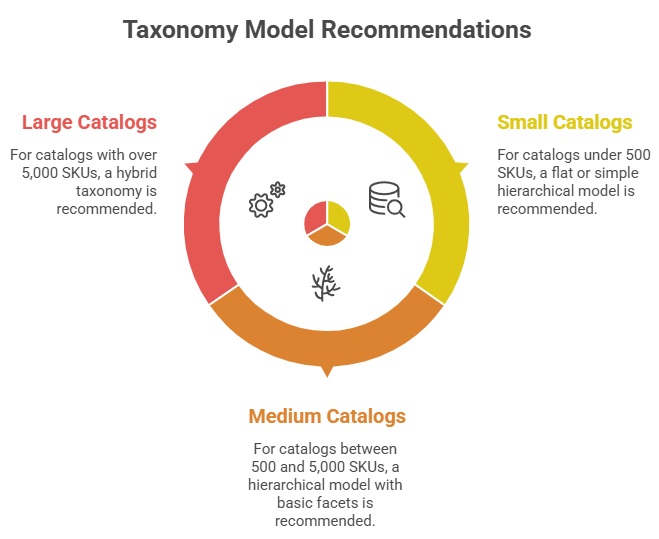
Hybrid Taxonomy (Used by Large Ecommerce Stores)
The hybrid model combines hierarchical navigation with faceted filtering. You browse to “Women’s Shoes” via the hierarchy, then filter by size, color, and heel height via facets.
This is the gold standard product data management for large catalogs. It gives customers the confidence of structured browsing with the flexibility of powerful filtering.
ALT TEXT: ECommerce Taxonomy Recommendation
Step-by-step guide to building an ecommerce product taxonomy
Step 1: Analyze Customer Search Intent and Behavior Data
Before touching your category structure, look at how customers actually shop. Pull data from your site search, Google Analytics, and heatmaps.
What terms are people searching internally? Where are they dropping off? What categories get clicks? Which ones get ignored?
This behavioral data is your taxonomy blueprint.
Step 2: Conduct Keyword Research for Taxonomy (SEO-First Approach)
How to optimize ecommerce taxonomy for SEO starts with keyword mapping. Use tools like Ahrefs, SEMrush, or Google Keyword Planner to identify high-volume search terms for each category.
For example, if “running shoes for women” gets 40,000 monthly searches, your subcategory should reflect that language, not “Women’s Athletic Footwear” hidden in a dropdown.
Step 3: Define Primary Categories and Logical Hierarchy
Now build your eCommerce taxonomy structure and hierarchy. Start with no more than 7 to 8 top-level categories. This keeps your navigation clean and manageable.
Each category should be mutually exclusive. “Shoes” and “Footwear” shouldn’t both exist. Every product should have exactly one logical home.
Step 4: Standardize Product Attributes and Naming Conventions
Create a master attribute list. Decide: is it “Color” or “Colour”? “Small/Medium/Large” or “S/M/L”?
Document every convention. This becomes critical when you’re adding hundreds of products a month.
Step 5: Map Products into Taxonomy Without Duplication
Now assign every product to its category. One product, one primary category. If a product fits multiple categories, use tags or collections, not duplicate listings.
Duplicate listings dilute SEO value and double your maintenance burden when you update pricing or descriptions.
Step 6: Test Taxonomy Using Real User Navigation Paths
Before going live, run usability tests. Give five to ten real customers a task: “Find a blue non-stick frying pan under $40” and watch how they navigate.
Where do they hesitate? Where do they click and backtrack? Those are your taxonomy weak spots. Fix them before launch.
Step 7: Launch, Monitor, and Iterate Continuously
After launch, track:
- Internal search queries with no results
- Category pages with high bounce rates
- Filters that are used vs. ignored
- Conversion rates by category
Schedule a quarterly taxonomy review. Update categories as your catalog evolves, customer language shifts, or new trends emerge.
Ecommerce taxonomy best practices for scalability and growth
- Keep taxonomy broad but intuitive (avoid over-nesting). Three to four levels of depth is the maximum for most stores.
- Ensure mutual exclusivity to prevent category overlap. Every product should belong to one primary category. Overlapping categories create confusion for both shoppers and search engines.
- Design taxonomy for scalability (large catalogs and future SKUs). Adding categories later forces URL changes and SEO disruption.
- Optimize taxonomy for mobile navigation and UX. On mobile, nested dropdowns are brutal to navigate. Design your top-level navigation to work with thumb-friendly taps.
- Build taxonomy with personalization and AI in mind. A clean, well-tagged taxonomy makes this possible.
- Create governance rules for long-term consistency. Document who can add categories, who approves attribute changes, and how naming conventions work. Apply product data management best practices to keep everything clean at scale.
Common eCommerce taxonomy mistakes (and how to fix them)
Understanding eCommerce catalog management mistakes to avoid is as valuable as knowing the best practices.
- Overcomplicated category structures that confuse users. Simplify to three or fewer levels. Consolidate niche subcategories into broader parents with better filtering.
- Inconsistent product attributes and naming. Audit your attribute data. Standardize naming conventions in a master reference document.
- Duplicate listings across categories. Assign each product a single primary category. Use canonical tags for any cases where products must appear in multiple locations.
- Ignoring search data and customer behavior. Pull your top 50 internal search queries every quarter. If customers are searching for something they can’t find, you have a taxonomy gap.
- Poor integration with site search and filters. Ensure your taxonomy attributes sync properly with your search engine. Most modern platforms (Shopify, Magento, BigCommerce) have documentation for this.
How to audit and improve your existing eCommerce taxonomy
Taxonomy Audit Checklist (Step-by-Step)
Run this audit quarterly, or any time you notice conversion drops.
- Export your full category tree and map it visually
- Identify categories with fewer than 5 products; consider merging
- Check for category name overlap or ambiguity
- Review all attribute fields for inconsistency
- Audit URL structures for logical hierarchy
- Test your top 20 customer journeys manually
- Identify the top 10 internal search queries with zero or poor results
When and How Often Should You Update Taxonomy?
- Update reactively: when a product category grows beyond 200 SKUs, customer search data reveals significant gaps, or you launch a new product line.
- Update proactively: a full taxonomy review every 6 to 12 months. Smaller audits quarterly. Never restructure your entire taxonomy mid-peak season; the SEO disruption alone can cost you months of rankings.
Future trends in eCommerce product taxonomy (AI, voice, personalization)
The eCommerce taxonomy landscape is shifting faster than most retailers realize. Here’s what’s already happening and what’s coming.
AI-driven auto-categorization and enrichment
Machine learning models can now analyze product titles, descriptions, and images to automatically assign categories and attributes. Forward-thinking retailers use tools like Google’s Product Taxonomy API and Anthropic’s Claude API to categorize thousands of new SKUs without human review.
Voice search and conversational commerce impact on taxonomy
When someone asks Alexa or Google Assistant for “a good waterproof hiking jacket under $150,” structured product data pulls the response. Poor taxonomy means your products don’t surface. Voice-optimized taxonomy uses natural language category names and rich attribute data that maps to conversational queries.
Hyper-personalized navigation experiences
The “one taxonomy fits all” model is giving way to dynamic navigation that adapts based on browsing history, past purchases, and real-time behavior. A returning customer who only buys running gear might see an entirely different navigation structure than a first-time visitor. This requires a clean, well-tagged taxonomy as its foundation.
Predictive taxonomy using behavioral data
Leading platforms are beginning to use predictive models to suggest new categories before they’re needed based on emerging search trends, social signals, and cross-retailer data. Retailers who have clean, structured taxonomy today can activate these capabilities tomorrow. Those with messy catalogs will spend years cleaning up before they can compete.
Conclusion
Your eCommerce taxonomy isn’t just a behind-the-scenes technical detail. It’s the foundation of your SEO, the backbone of your user experience, and a direct driver of conversion.
Whether you’re building from scratch or auditing an existing structure, the principles are the same: organize with your customer in mind, validate with data, and build for the catalog you’ll have, not just the one you have today.
Start with the seven-step framework in this guide. Run the audit checklist on your existing store. Then commit to making taxonomy a living part of your eCommerce strategy.
If you want to rely on experts and stay ahead, talk to the team at Vserve Solutions to build your strategy.
FAQs About eCommerce Product Taxonomy
1. What is the difference between product categories and attributes?
Categories define where a product lives in your catalog. Attributes describe what the product is, like size, color, and material.
2. Where does an eCommerce manager fit in the taxonomy?
The eCommerce manager owns taxonomy governance, like defining naming rules, approving new categories, and auditing the structure regularly.
3. How to classify an owner in the e-commerce job taxonomy?
Store owners typically sit above the eCommerce manager and set business goals that taxonomy decisions must support.
4. How does product taxonomy improve user experience?
It reduces clicks to product, makes filtering logical, and creates intuitive navigation that keeps shoppers engaged and converting.
5. What are the benefits of eCommerce clothing category taxonomy?
A well-structured clothing taxonomy improves filtered search for size and color, reduces returns, and makes seasonal catalog updates faster to manage.