


Shopify Product Catalog Management: Best Practices to Organize, Optimize & Scale Your Store

Last updated on July 27th, 2026

Running a successful online store requires more than just launching a website and listing your products. To truly thrive, modern merchants must focus heavily on Shopify Product Catalog Management to keep their offerings structured and easy to navigate. When your backend is messy, your customers struggle to find what they want, leading to abandoned carts.
Table of Contents
What Is Shopify Product Catalog Management??
Why Catalog Management Is Important
Essential Elements of a Well-Managed Shopify Catalog
Shopify Product Catalog Management Best Practices
Common Catalog Management Mistakes to Avoid
Shopify Features That Simplify Catalog Management
What Is Shopify Product Catalog Management?
Shopify Product Catalog Management is the strategic process of organizing, editing, and maintaining your inventory data across your online store. This involves everything from categorizing items and writing details to managing pricing and structuring variants. It ensures that all product information is consistent, up to date, and accurate for your audience.
When you invest in professional Shopify ecommerce development, your technical architecture is built to support this essential database structure. Key components of this process include organizing collections, updating inventory levels, and managing digital assets. Mastering these components allows your business to scale smoothly as you introduce new lines.
Why Catalog Management Is Important
Effective Shopify Product Catalog Management is the backbone of any growing digital storefront. When your listings are disorganized, customers experience frustration and search engines fail to index your pages properly. A clean structure directly improves user retention and streamlines internal workflows.
- Better shopping experience: Customers can find exactly what they are looking for within seconds, reducing friction and bounce rates.
- Improved SEO: Structured product data and clear hierarchies make it easier for search engines to crawl and rank your online store.
- Higher conversions: Detailed, accurate product listings build trust, encouraging shoppers to complete their purchases with confidence.
- Inventory accuracy: Keeping your catalog synchronized prevents overselling and helps you maintain reliable stock levels across all channels.
- Operational efficiency: A standardized database allows your team to upload new products and update pricing with minimal manual effort.
Building a clean catalog is much simpler when your store benefits from expert Shopify ecommerce development. Professional developers ensure your backend is optimized to handle complex data updates without crashing or slowing down.
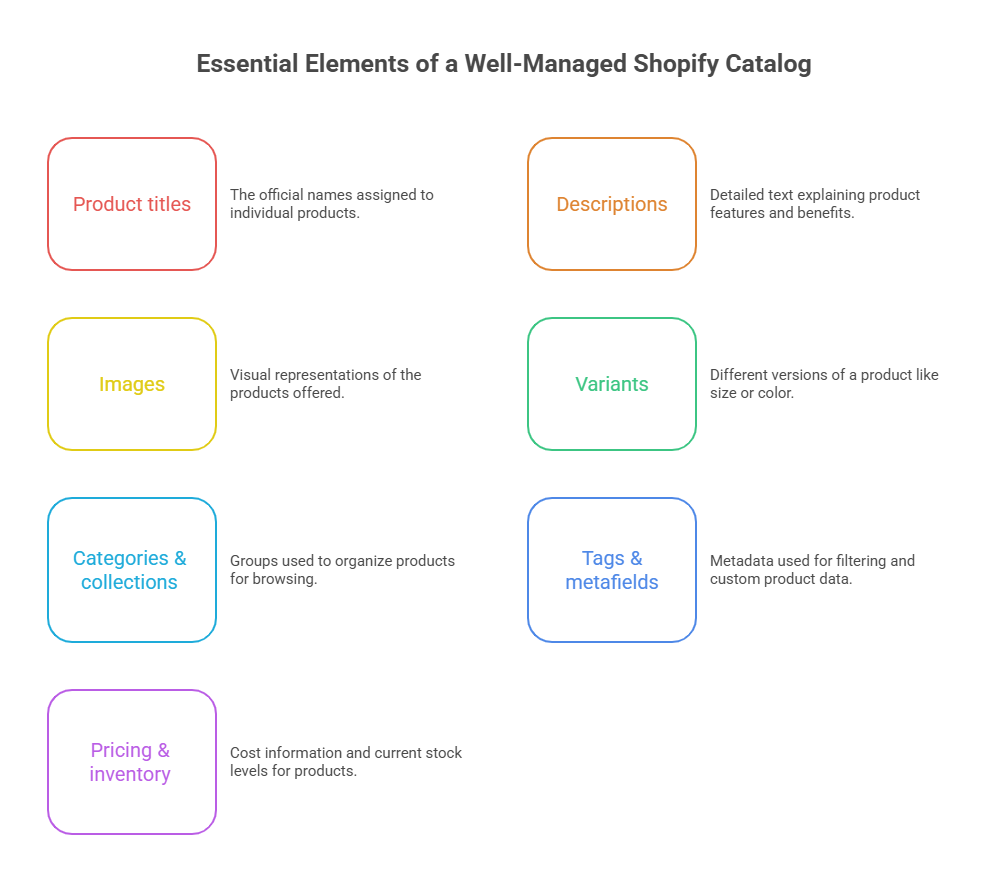
Essential Elements of a Well-Managed Shopify Catalog
Every successful digital storefront relies on a highly structured product database. To build an intuitive shopping experience, you must optimize several critical components within your platform. Let us look at the essential building blocks that require continuous attention.
Product titles
Your titles need to be clear, descriptive, and highly searchable for both shoppers and search engines. A strong naming convention helps customers immediately understand what you are selling.
Descriptions
Great descriptions highlight key benefits, answer common questions, and naturally integrate your target keywords. They should bridge the gap between technical specs and persuasive storytelling to drive conversions.
Images
High-resolution photos showing different angles are crucial for setting realistic expectations and reducing returns. Ensure all your images are optimized for fast loading times to keep your site running smoothly.
Variants
Properly grouping variants like size, color, and material keeps your storefront clean instead of cluttering it with duplicate pages. This makes it easy for customers to see all available options in one place.
Categories & collections
Using logical categories helps customers self-segment and find what they need without scrolling endlessly. Grouping related items together also opens up excellent opportunities for cross-selling.
Tags & metafields
Tags and metafields allow you to add custom data fields and power advanced filtering options on your collection pages. This gives you complete control over how your product data is organized and displayed.
Pricing & inventory
Keeping your prices and stock levels updated in real time prevents painful overselling issues and builds customer trust. Accurate backend data is vital for running smooth automated promotions.
 Shopify Product Catalog Management Best Practices
 Shopify Product Catalog Management Best Practices
Implementing the right strategies for Shopify Product Catalog Management saves time and prevents costly errors. These standards keep your database clean, searchable, and ready for future growth.
- Create a consistent product taxonomy: Establish a clear hierarchical structure for your categories and subcategories so everything has a logical home.
- Standardize product information: Use consistent formatting for your titles, dimensions, and technical specifications across all listings.
- Optimize for SEO: Ensure your meta titles, descriptions, and image alt text include relevant search terms to drive organic traffic.
- Use smart collections effectively: Automate your collections using product tags to save hours of manual sorting and curation.
- Maintain accurate inventory: Connect your inventory management tools directly to your store to prevent stock discrepancies.
- Perform regular catalog audits: Periodically review your store to fix broken links, update seasonal items, and delete discontinued product pages.
- Enrich product data: Add detailed size charts, materials, and care instructions to give buyers complete confidence before they purchase.
- Automate repetitive tasks: Use bulk editing tools and automation workflows to handle routine updates, freeing up your team for big-picture growth.
Maintaining these standards is much easier when your site has been built using professional Shopify ecommerce development. A well-coded store provides a solid framework that supports these bulk updates and automated workflows seamlessly.
Common Catalog Management Mistakes to Avoid
Even experienced merchants can run into trouble when their databases grow too quickly without oversight. Avoiding these common mistakes will protect your search rankings and preserve the user experience.
- Duplicate listings: Creating multiple pages for the exact same product confuses search engines and dilutes your organic SEO value.
- Inconsistent naming: Mixing up title formats makes your brand look unprofessional and makes it harder for customers to browse.
- Missing metadata: Leaving out alt tags, meta descriptions, and structured data limits your visibility on search engine results pages.
- Poor image quality: Using blurry or inconsistently styled product photos directly lowers your conversion rates and damages trust.
- Outdated inventory: Displaying out-of-stock items as available leads to canceled orders and frustrated, unhappy shoppers.
- Weak collection structure: Overcomplicating your menus makes your site hard to navigate, forcing potential buyers to shop elsewhere.
Shopify Features That Simplify Catalog Management
The platform offers several built-in tools designed to help merchants handle large inventories efficiently. Utilizing these native capabilities simplifies your daily operations and reduces manual labor.
- Bulk Editor: This handy tool lets you edit multiple fields, like prices, tags, and inventory levels, across several products simultaneously.
- CSV imports/exports: Easily migrate, back up, or update thousands of listings at once using standardized spreadsheets.
- Metafields: Create custom fields to display specialized details, such as fabric care or release dates, that do not fit in the standard editor.
- Shopify Flow: Automate everyday tasks, like tagging products when they run out of stock, to save your team valuable time.
- Product templates: Design unique page layouts for different categories to present your items most appealingly.
- Smart collections: Automatically group products based on rules like price, vendor, or tag to keep your collections fresh without manual effort.
Should You Outsource Shopify Product Catalog Management?
As your business grows, keeping your inventory organized can become a full-time job that pulls your focus away from marketing and sales. Many brands choose to partner with experts to handle this complex database work.
- Key Consideration: If your team spends more time updating spreadsheets than growing the business, it is time to look at external support.
- When outsourcing makes sense: If you have a massive inventory, frequent product launches, or seasonal updates, external help keeps your store running smoothly.
- Tasks commonly outsourced: Merchants frequently hand off bulk uploads, image optimization, SEO writing, and inventory synchronization to dedicated specialists.
- Benefits and considerations: Outsourcing saves internal resources, improves data accuracy, and ensures your store is optimized by professionals.
Partnering with an agency that understands both database management and Shopify ecommerce development ensures your backend remains highly efficient. This keeps your storefront fast, organized, and perfectly optimized for conversions.
Conclusion
A well-structured store is the foundation of any successful online business, making ongoing Shopify Product Catalog Management absolutely key. Keeping your listings organized, optimized, and accurate improves the customer journey and boosts your search rankings. Regular audits and smart automation are essential to maintaining this structure as you scale your brand.
Frequently Asked Questions
1. What is Shopify catalog management?
This is the process of organizing, optimizing, and maintaining all product data on your storefront. It includes updating descriptions, structuring variants, and organizing collections to ensure a seamless shopping experience.
2. How often should I audit my catalog?
It is best practice to perform a quick review monthly and a comprehensive audit quarterly. This helps you catch broken links, update seasonal items, and clean up inactive product pages.
3. How can I manage large product catalogs?
You can handle large databases efficiently by using CSV imports, setting up smart collections, and utilizing native bulk editing tools. Many growing brands also choose to outsource these complex tasks to specialized professionals.
4. Which Shopify tools help automate catalog management?
Tools like Shopify Flow, the built-in bulk editor, and automated smart collections are excellent for reducing manual work. There are also many third-party apps available in the Shopify App Store to assist with bulk updates.
5. How does catalog management affect SEO?
A clean, well-organized structure makes it much easier for search engines to crawl and index your pages. Structured metadata and clear category hierarchies directly boost your organic search rankings.